Showing posts with label C Sharp. Show all posts

Friday, November 2, 2012

How to change NewDataSet xml root name while creating xml using WriteXml() method of Dataset?


This is default behavior of WriteXml() method when we create xml then it adds  <NewDataSet> node as root xml node and <Table> as child node. In this article, I am explaining- How to change <NewDataSet> xml root name while creating xml using WriteXml() method of Dataset?

Let first see the default case-

Suppose you we have one DataSet object ds and we are filling it will data source, like this-

Dataset ds= new DataSet();
ds= datasource;


After that we are using WriteXml() method to create XML, like this-

ds.WriteXml("FileName");

Then in this case output will be like this-

<NewDataSet>
  <Table>
    <Emp_ID>717</Emp_ID>
    <Emp_Name>Jitendra Faye</Emp_Name>
    <Salary>35000</Salary>
  </Table>
----------
----------
----------
</NewDataSet>


Here we can see that <NewDataSet> and   <Table> is default tag here.

Now to change these default tag follow this code, Here I am changing <NewDataSet> tag as <EmployeeRecords> tag and <Table> tag as <Employee> tag.

Here is code-

Dataset ds= new DataSet();
ds= datasource;


//Giving Name to DataSet, which will be displayed as root tag

ds.DataSetName="EmployeeRecords";

//Giving Name to DataTable, which will be displayed as child tag

ds.Tables[0].TableName = "Employee";

//Creating XML file
ds.WriteXml("FilePath");


Now after executing this above code generated XML file will be like this-

<EmployeeRecords>
  <Employee>
    <Emp_ID>717</Emp_ID>
    <Emp_Name>Jitendra Faye</Emp_Name>
    <Salary>35000</Salary>
  </Employee>
----------
----------
----------
</EmployeeRecords>


Here we can see that DataSet name is coming as root tag and DataTable name is coming as child tag.

Note-

Before giving name to DataTable (ds.Tables[0].TableName) first check that it should not be null otherwise it will cause an error.


Thanks


Monday, October 15, 2012

How to add custom action to Windows Installer using C# ?


Visual Studio Package and Development wizard provides facility to create setup of your .Net Application. But in some cases we want to control the installation steps using custom action, means we want to add some custom functionality while installing the application.

Using custom action we can handle functionalities like-

-    Setting registry value while installation
-    Reading registry value while installation
-    Serial key implementation

Etc.

In this article, I am explaining - How to add custom action to Windows Installer in C#?

Here I am giving complete steps with pictorial representation. Follow these steps -

Step1: First, develop your application with required functionality.

Step2: For performing your custom action while installing application, we need to add "Installer Class" in application.  Add one "Installer Class" using "Add New Item" to the project like this-


Installer


Step 3: After adding Installer Class to the project , add your custom functionality , Here I am adding some code in "MyInstaller.cs" file-


//Code to perform at the time of installing application
public override void Install(System.Collections.IDictionary stateSaver)
        {
            System.Windows.Forms.MessageBox.Show("Installing Application...");
        }

//Code to perform at the time of uninstalling application
        public override void Uninstall(System.Collections.IDictionary savedState)
        {
            System.Windows.Forms.MessageBox.Show("Uninstalling Application...");
        }


Here I have added to events, this is for custom functionality, you can write your own code which you want to perform at the time of Installing and uninstalling application.

Step 4: Now set your application in "Release Mode" and build it.

Step 5: Now we have to add setup project for developed application, so right click on "Solution Explorer" and click on "Add -> New Project option".

Here you will get Project Templates dialog, Select "Visual Studio Installer" from "Other Project Types" option.

See this Image-


Setup


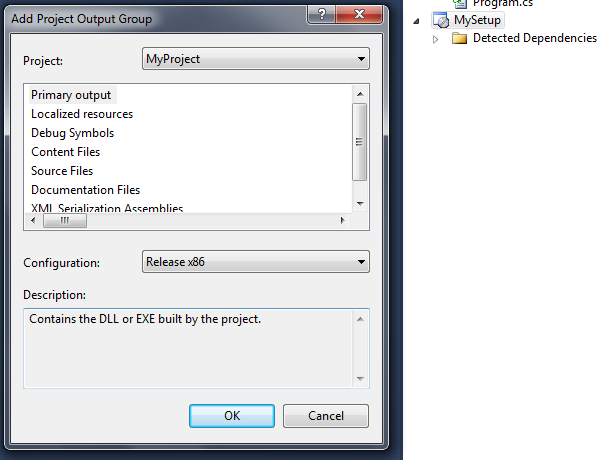
Step 6: After adding Setup project to solution, set project output for Setup project. For this right click on setup project and click on "Add -> Project Output"

you will get "Add project Output Group Dialog”, Here you need to set some setting like this-


Add Project Group


After setting click on "OK" button.

Step 7: Now to add custom action, again right click on "Setup project" and click on "View -> Custom Actions".


Custom Action


Now to set Custom action for installation right  click on "Install" click on "Add Custom Action",

Here double click on "Application folder" and select Primary output from Myproject and click on "OK" button.


Primary Output


Step 8: Repeat same for UN-installation process also.

Step 9: Finally your solution structure will be like this-


Solution Explorer


Step 10: Now build setup project and finally build the solution. Now you are done.

To test the complete process just try to install your application now, while installing application you will get message like this-


Installing Application


This is the same message which we have given in Install () event. Means whatever the action or code we will write in this event that will be perform at the time of installing application.

//Code to perform at the time of installing applicationpublic override void Install(System.Collections.IDictionary stateSaver)
        {
            System.Windows.Forms.MessageBox.Show("Installing Application...");
        }

And when you will uninstall application you will get message like this-


Uninstalling Application

 Here also we can see that the code which we have written in Uninstall () event that is executing.
Like Install () event we can handle Uninstall () event also.


//Code to perform at the time of uninstalling application
        public override void Uninstall(System.Collections.IDictionary savedState)
        {
            System.Windows.Forms.MessageBox.Show("Uninstalling Application...");
        }


These complete helps you to handle custom action while installation or uninstallation, Using these step we can implement serial key for application, means while installing application we can set expiration time for application and while uninstallation we can delete application related registry settings.


Thanks


Monday, October 8, 2012

How to compare DataTables?


Data Tables can be easily compared. This comparison can be done using Merge () and GetChanges() methods of DataTable class object.

In this article, I am taking 3 DataTable class object- dataTable1, dataTable2 and dataTable3
Here dataTable3 will hold the comparison result of dataTable1 and dataTable2.

Here is simple code-

//Merging datatable2 to data table 
dataTable1.Merge(dataTable2);

//Getting changes in dataTable3

 DataTable dataTable3= dataTable2.GetChanges();


In above lines of code, first I am merging datatTable1 and dataTable2 and combined result will be stored in dataTable1. Finally to get changes I am using GetChanges() method of dataTable1 object.

DataTable dataTable3= dataTable2.GetChanges();

Here GetChanges() method will return one DataTable class object and  returned result will be stored in dataTable3 object.


Thanks

Tuesday, September 4, 2012

How to change sort order of crystal report by using code?


Crystal report -

Crystal report is a tool which provides facility to display data in reporting format. It also support functionality like sorting of data based on sort field. This sorting can be done in design time and run-time also.


Sorting data using sort field is easy while design time but if we want to sort data in run-time then some time it can generate error. The most common error for run-time sorting is-


"The sorting already exists"


In this article, I will explain -
How to change sort order of crystal report by using code?

First I will tell what the reason for this error is and how we can solve this error.


Reason-


This error comes when we are trying for setting sort field for crystal report using code and that particular sort-field is already added as sort order field for crystal report in design time.


Example-


Suppose we want set "Name" as sort order field and this field ("Name") is already present as sort order in design time then it will generate error.


Workaround-


Simple workaround for this problem is that swapping of sort order fields.

Suppose you have added two fields (firstName and lastName) as sort fields for report in design time
And present sort field is firstName now if you want to changes sort field to lastName then will generate error. So here we have a trick – Take any column from table which is not present in sort field which you have added in design time.

Design time –

Sort field (0) - firstName
Sort field (1)-lastName

In code set like this-

Sort field (0) - firstName
Sort field (1) - address (any field of table which is not in sort field)

Now again swap between firstName and lastName. This time it will successful because now currently we don’t have lastName as sort field in report. 

Here I am going to explain how we can solve this problem? Here is sample code to solve this problem-

String SortField="yourSortField";

bool fieldPresent = false;

 //CHECKING SORT FIELD PRESENT IN THE REPORT IF YES THEN SWAP THE POSITION //TO ZERO

    for (int i = 0; i <= Report100.DataDefinition.SortFields.Count - 1; i++)
  {
       if (Report100.DataDefinition.SortFields[i].Field.FormulaName == SortField)
        {
            fieldPresent = true;
            FieldDefinition tempDef = New FieldDefinition;
            FieldDefinition currentDef =New FieldDefinition;

            //HOLDING CURRENT [0'TH] SORT FIELD

            currentDef = Report100.DataDefinition.SortFields[0].Field;

            //HOLDING FOUND SORT FIELD

            tempDef = Report100.DataDefinition.SortFields[i].Field;

            //REPLACING FOUND FIELD  DEFINITION WITH OTHER FIELD DEFINITION EXCEPT (Already Present SortField in design time) BECAUSE THESE SORT FIELDS ARE ALREADY IN REPORT SO GENERATE ERROR


            Report100.DataDefinition.SortFields[i].Field = Report100.Database.Tables[0].Fields[5];


            //SWAPPING THE CURRENT SORT FIELD WITH FOUND SORT FIELD

            Report100.DataDefinition.SortFields[0].Field = tempDef;
            Report100.DataDefinition.SortFields[i].Field = currentDef;

            break;

        }
    }

    //IF SORT FIELD IS NOT PRESENT THEN REPLACE THE CURRENT FIELD DEFINITION


    if (fieldPresent == false)

    {
        FieldDefinition FieldDef = New FieldDefinition;
        FieldDef = Report100.Database.Tables[0].Fields[SortField];
        Report100.DataDefinition.SortFields[0].Field = FieldDef;
    }

Report100.DataDefinition.SortFields[0].SortDirection = CrystalDecisions.Shared.SortDirection.AscendingOrder;


In above code, I am setting sort order field, Here this I am swapping sort field orders but we can’t swap sort field directly because if field is present as sort field then it will generate error, for this I have written code to identify that sort field is present or not.


If sort field is not present then I am directly setting given field ("SortField") as sort field. Otherwise to set sort order field I am implementing swapping concept.


For this I have take two objects of  FieldDefinition class.


FieldDefinition tempDef = New FieldDefinition;
FieldDefinition currentDef =New FieldDefinition;


Using this first, I am replacing present sort order field  with different (which is not present in sort order field ) sort order field . Finally I am changing the sort order like this-

 //SWAPPING THE CURRENT SORT FIELD WITH FOUND SORT FIELD


Report100.DataDefinition.SortFields[0].Field = tempDef;

Report100.DataDefinition.SortFields[i].Field = currentDef;


Now done, try this code, I have successfully implemented this code.


Thanks


Friday, July 13, 2012

Dot Net Interview questions for 2+ years experience


Hi All,

If you have 2+ years of experience then you should be ready for more paper work instead of oral in interview because there you have to prove yourself in-front of interviewer.

I have collected some interview questions those have attended by me and my friends.

In this article, I am giving you some Dot Net Interview questions for 2+ experiences.

---------------------------------------------------------------------------------------------------------------------
---------------------------------------------------------------------------------------------------------------------

1. Tell about your technical profile.
2. What was your role in your project?
3. In which module you have worked explain?
4. Describe GridView events (Paper).
5. How to change Label's color based on Label's value  (Paper)?
6. Write the code to perform edit and delete operations using  GridView (Paper).
7. What are the Validation controls in ASP.Net?
8. How you will implement Custom Validator Control functionality (Paper)?
9. What are Generics?
10. What is the  difference between HashTable and Dictionary?
11. What is Ajax and  Jquery?
12. Which control have you used in AJAX?
13. What is the use of ModalPopUpExtender (Paper)?
14. WCF Basics (Types of binding)
15. What are Database Constraints?
16. Difference between Primary and Unique key?
17. Difference between Function and Procedure?
18. Can we store DataSet in View State?
19. When we will store DataSet in Session then which memory will be filled client side or server side?
20. Difference between reference and out parameter?
21. How to execute stored procedure?

-----------------------------------------------------------------------------------------------------------------------
-----------------------------------------------------------------------------------------------------------------------

1. What is View State?
2. Where is View State is saved and how View State value is retained between Post Back. (Practical)?
3. Form Authentication Process (Using Web.Config file and Database in paper).
4. If View State value is "X" and I have changed it to "Y" in Page_Load then what will be the final value of View State?
5. Page Life cycle with use.
6. Performance Analyzer tool.
7. How to declare unique key?
8. Diff. between Equi join and Right outer join (Paper)?
9. Define Caching types.
10. How to implement SQL Cache (Paper)?
11. How to call Web service using AJAX (Paper)?
12. How to change Color of Label using Jquery (Paper)?
13. What is Table Object/Variable?
14. How to call stored procedure using Entity Framework?
15. What is the difference between Overloading and Overriding?
16. What is the difference between ExecuteScalar() and ExecuteNonQuery()?
17. What if I will pass Select * in ExecuteScalar()?

---------------------------------------------------------------------------------------------------------------------
---------------------------------------------------------------------------------------------------------------------

1. Tell me about projects.
2. Your role in project.
3. Which performance tool you have used?
4. Define abstract class and interface?
5. Why to use static members?
6. What is partial class and advantages?
7. GridView and DataList differences.
8. State Management type.
9. What is view state and use?
10. Caching techniques.
11. WCF and Web service differences.
12. Define WCF contracts.
13. Define design pattern.
14. What is facade pattern?
15. Triggers use and types.
16. Define cursor.
17. Difference between clustered and non-clustered index.
18. How many clustered index can be declared for a table.
19. What is view?
20. What is AJAX and Update-panel?
21. If you have 2 Update-panel then how to update one update panel from second?

---------------------------------------------------------------------------------------------------------------------
---------------------------------------------------------------------------------------------------------------------

1. Define your Technical skills.
2. Your Role in project.
3. Define features of OOPS.
4. How you will replace the functionality of parent class function in child class.(Paper)
5. Difference between Interface and abstract class (Use).
6. Functions of CLR.
7. Where you will use Cookie, Session and View State.
8. What are InProc and OutProc Session?
9. If you will save session in OutProc then where it will be saved and when it will be expired.
10. Difference between Web service and WCF
11. Design pattern.
12. Write sequence of select query-

 [ WITH ]
SELECT select_list [ INTO new_table ]
 [ FROM table_source ]
 [ WHERE search_condition ]
[ GROUP BY group_by_expression ]
[ HAVING search_condition ]
[ ORDER BY order_expression [ ASC | DESC ] ]

The UNION, EXCEPT and INTERSECT operators can be used between queries
to combine or compare their results into one result set.

13. What is ROW_NUMBER () in SQL Server?
14.  Difference between Union and Join.
15. Return value for ExecuteNonQuery().
16. Can we execute DML command in ExecuteScalar()?
17. Difference between DataSet and DataReader.
18. If provider is given OracleClient then can we connect with SQL Server?
19. Where you have used JQuery in your project?
20. Namespace for web-part (SharePoint)    - System.Web.UI.WebControls.WebParts Namespace
21. For creating a site what are the main concepts you need to consider in UL layer, middle-ware and Database Layer.

--------------------------------------------------------------------------------------------------------------------
--------------------------------------------------------------------------------------------------------------------

1. Explain different versions of .Net Framework.
2. What is OPPS and explain concept of OPPs?
3. What is static members and where you have used static members in your project?
4. What is difference between Constant  and ReadOnly?
5. Explain different Access Specifier.
6. What is Entity Framework? Explain difference between LINQ and Entity Framework.
7. Explain Page life cycle.
8. Explain Membership provider.
9. What is WCF?
10. Explain different types of WCF Binding and where you will use which binding?
11. Explain Index in SQL Server. Have you created any index for your project?
12. What is difference between Primary key  and Unique key?
13. What is Stored procedure and it's advantages?

--------------------------------------------------------------------------------------------------------------------
--------------------------------------------------------------------------------------------------------------------

1. What is difference between ArrayList and HastTable?
2. Where we have to use static members?
3. What is constants?
4. What is difference between Interface and Abstract class?
5. How you will handle error in C#?
6. What is the use of Virtual?
7. What is App Domain?
8. What is Session and Cache object?
9. What is Worker Process?
10. Write syntax for stored procedure.
11. How to handle error in Stored Procedure?
12. Explain Binding in WCF.
13. Explain Contract in WCF.
14. How you will host WCF service?
15. How to handle Error in WCF service?
    
--------------------------------------------------------------------------------------------------------------------
--------------------------------------------------------------------------------------------------------------------

1. Explain your Projects
2. What is Generics?
3. What is Delegate and Events?
4. What is difference between Protected and Protected Internal?
5. What is Entity Framework?
6. Explain Page Life Cycle.
7. Explain Session and Application object.
8. What is Worker Process?
9. What is ISAPI?
10. Use of Global.asax?
11. What us JQuery and How you will use JQuery in your application?
12. What is ISNAN?
13. Have you used Telerik controls in your Project?
14. What is stored procedure?
15. How to call Stored Procedure using .Net code?
16. What is Delete and Truncate?
17. How you will insert Bulk records in database?

--------------------------------------------------------------------------------------------------------------------
--------------------------------------------------------------------------------------------------------------------


These are the questions those have attended by me and my friends in different companies; here we can see that most of the questions are same. I hope these questions will help you all to attend the interviews.


Thanks

Thursday, July 12, 2012

How to generate random color in C#?


In some of the case, we have a requirement to generate Random color for controls, this can be done by using Random class, Random class allows us to generate random number from given range, as we know that we can generate color using number combination, like (256,256,256).

Color is generated using combination of (256,256,256) numbers, these numbers represent RGB colors means RED, GREEN, BLUE colors. Every color is combination of RED, GREEN, BLUE colors only. So to generate random color we have to generate random combination of these numbers (256,256,256).

 Here I am explaining - How to generate random color in C#?
 
In this example, I have used Color.FromArgb() method, which accepts these parameters for color combination. This method returns generated color using given parameters, but we have to generate random color so we have to pass random color combination.


Here is code-

   private void button1_Click(object sender, EventArgs e)
        {
            //Generating object for Random class 
            Random objRand = new Random();
        
            //Generating object for Color class
             Color objColor = Color.FromArgb(objRand .Next(256),objRand .Next(256),objRand .Next(256));

            //Assigning newly generated color to Button1 

            button1.ForeColor = objColor ; 
        }

In this code, first I have defined object of Random class, which will help us to generate random number.  After that using Color class object I am generating color combination-

   Color objColor = Color.FromArgb(objRand .Next(256),objRand .Next(256),objRand .Next(256));

This line of code will return color which will be in format of color call object so we need any color class object to hold this color. Here I have declared one object by named objColor which is representing color class object. 

Finally I am assigning generated color to Button1.

   button1.ForeColor = objColor ;

Here objColor is object of color class which holds generated random color using  Color.FromArgb() function.


Thanks

Tuesday, July 3, 2012

How to get Identity column value after inserting record using DataAdapter?


DataAdapter-

DataAdapter is an object which provides facility to interact with database. Using this object we can fill any DataSet class object or we can perform some command over database. Generally it is used for filling DataSet with database result but it can also be used for inserting record to database.

After inserting record, suppose if we want to get identity column value of new record then again we have to query to database. This process degrade the application performance because for this we have to make two trips of database which should not be happen. This task cab be done using one database trip only.  In this article, I am explaining - How to get Identity column value after inserting record using DataAdapter?

Here is code-        

            SqlConnection con = new SqlConnection("Connection string");
            con.Open();
            DataSet ds = new DataSet();
            SqlDataAdapter da = new SqlDataAdapter("select * from TableName", con);
          
            //Assigning schema of Table to DataSet
            da.FillSchema(ds, System.Data.SchemaType.Source, "TableName");
            da.Fill(ds, "TableName");

            //Creating object of CommandBuilder to perform insert operation over DataSet
            SqlCommandBuilder cmdb = new SqlCommandBuilder(da);
          
            //Adding new row to DataSet
            DataRow row = ds.Tables[0].NewRow();
          
            //Filling data to row
            row["col1"] = "value1";
            row["col2"] = "value2";

            //Adding newly created row to DataSet object
            ds.Tables[0].Rows.Add(row);

            //Updating changes to DataSet
            da.Update(ds, "TableName");

            //Getting identity column value of newly added record
            int identityValue = Convert.ToInt32 ( row["identityColunmName"]);


In above code, I am inserting new record to database using DataAdapter, I have used one DataAdapter class object - "da”. First, I am getting record into DataSet object - "ds", but for getting identity column value we need to assign table schema to DataSet object before filling.

Like this-

           //Assigning schema of Table to DataSet
            da.FillSchema(ds, System.Data.SchemaType.Source, "TableName");
            da.Fill(ds, "TableName");


After execution of these lines table schema will be assigned to DataSet object with identity column, so that while adding new row to DataSet we can access identity column value.

Like this-

           //Getting identity column value of newly added record
            int identityValue = Convert.ToInt32 (row["identityColunmName"]);

 
Here "identityColunmName" is name of identity column in the table, once we will add new row to DataSet object we can access identity column value of newly added record.


Note-

In this example it is must that database table should contain identity column otherwise this example will not work. Next value for column can be accessed only when that column is identity column.


Thanks

Friday, June 29, 2012

How to search record in DataTable?


DataTable-

DataTable is server side object in .Net which is collection of Rows and Columns. It represents the in-memory table's data. It can hold data of any single table but using join we can hold data from multiple table. In programming it is used to hold data after getting data from database.


Generally we use DataTable to hold result-set (query's result), but in some of the cases we want to perform searching operation on DataTable. Here I am explaining -
How to search record in DataTable?

If we want to search any data in DataTable object then it can be done by using looping, but this is not a good approach because DataTable have some inbuilt methods to complete this task.


There are following methods-


1. Find () 
- Using this method we can perform searching on DataTable based on Primary  key, it   
                    returns DataRow object.

2. Select()
- Using this method we can perform searching on DataTable based on search criteria   
                    means by using column name we can search , it returns array of DataRow object.

Here I am explaining both methods, Follow this code-

 
 private void btnSearch_Click(object sender, EventArgs e)
        {
            try
            {
                //Creating DataTable object
                DataTable dtRecords = new DataTable();

                //Creating DataColumn object
                DataColumn colName = new DataColumn("Name");
                DataColumn colID = new DataColumn("ID");

                //Adding DataColumns to DataTable
                dtRecords.Columns.Add(colID);
                dtRecords.Columns.Add(colName);

                //Creating Array of DataColumn to set primary key for DataTable
                DataColumn[] dataColsID = new DataColumn[1];
                dataColsID[0] = colID;

                //Setting primary key
                dtRecords.PrimaryKey = dataColsID;

                //Adding static data to DataTable by creating DataRow object
                DataRow row1 = dtRecords.NewRow();
                row1["ID"] = 1;
                row1["Name"] = "Rajendra";
                dtRecords.Rows.Add(row1);

                DataRow row2 = dtRecords.NewRow();
                row2["ID"] = 2;
                row2["Name"] = "Rakesh";
                dtRecords.Rows.Add(row2);

                DataRow row3 = dtRecords.NewRow();
                row3["ID"] = 3;
                row3["Name"] = "Pankaj";
                dtRecords.Rows.Add(row3);

                DataRow row4 = dtRecords.NewRow();
                row4["ID"] = 4;
                row4["Name"] = "Sandeep";
                dtRecords.Rows.Add(row4);

                DataRow row5 = dtRecords.NewRow();
                row5["ID"] = 5;
                row5["Name"] = "Rajendra";
                dtRecords.Rows.Add(row5);

                //Find() Method

                //Finding data in DataTable based on primary key using Find() method
                DataRow FindResult = dtRecords.Rows.Find("3");

                if (FindResult != null)
                {
                   //Showing result to grid
                    DataTable dtTemp = new DataTable();
                    dtTemp = dtRecords.Clone();
                    dtTemp.Rows.Add(FindResult.ItemArray);
                    dataGridFind.DataSource = dtTemp;
                }

               //Select () Method

               //Selecting data from DataTable based on search criteria using Select() method
                DataRow[] SelectResult = dtRecords.Select("name='Rajendra'");

                if (SelectResult != null)
                {
                   //Showing result to grid
                    DataTable dtTemp = SelectResult.CopyToDataTable();
                    dataGridSelect.DataSource = dtTemp;
                }
            }
            catch (Exception)
            {
                //Handle exception here
                throw;
            }
 }


Note -
 

Before using Find () of DataTable it is must that we need to Primary key for DataTable object. Because Find () method works based on primary key value only.

In above code, I have created on DataTable object (dtRecords) using DataTable class, and I have filled this DataTable object with some static records. For this I have used DataColumn and DataRow classes.
I have set Primary key column for DataTable object, so that we can use Find () method over DataTable.

//Setting primary key
 dtRecords.PrimaryKey = dataColsID;

Here  dataColsID is array of DataColumn.
After setting primary key to DataTable, I have Find () method like this-

//Finding data in DataTable based on primary key using Find () method
 DataRow FindResult = dtRecords.Rows.Find("3");


Here Find method will return result as DataRow object, for fetching data from DataTable object using Find () method we need to pass primary key value because based on that it will return result.


For getting data using Select () method, I have written code like this-


//Selecting data from DataTable based on search criteria using Select () method
DataRow[] SelectResult = dtRecords.Select("name='Rajendra'");


Select () method works based on search criteria, Here ("name='Rajendra'“) is search criteria for Select () method, it returns array of DataRow object.


Finally to show result I have used two separate DataGridVIew controls and output will be like this-


Result of Find() and Select() method

As we can see in image, For Find () method, one record in coming because in DataTable object we have only one record with ID=3.
And for Select () Method, 2 records are coming because we have 2 records in DataTable obejct with name = "Rajendra".

To perform search operation on DataTable Find() and Select() methods can be used but both methods have different criteria. 


Note - 

1. If we have primary key in table then Find() and Select() both methods can be used
2. If we don't have primary key then we can use only Select() method.


Thanks


Thursday, June 21, 2012

Error logging using Event log in C#


Error Logging-

 
Error logging is a process of logging or tracking error which comes in run-time. When you we run our application.  It is good practice to log application's error so that user can easily understand the error cause. This is also useful for developer to track the error and resolve those errors.

 .Net provides inbuilt class (EventLog) to log Application events; by including System.Diagnostics Namespace we can use this class to log events or errors. Using EventLog class we can create Error source and Error log.


Here Error source represent to the application which will generate the error. And Error log will hold all error related to that Error source. By this way errors can be easily identified that what is the source of error because it is maintain in one block only. 

In this example, I am showing - How to log error using Event log in C#?

Here is code-

Include this line on top of the form-


using System.Diagnostics;

Now I have defined this function-

//Function to log error

public void LogError(string strError)
        {
            // Creating the source, which will generate error
            if (!EventLog.SourceExists("MyApplication"))
            {
                //Creating log, where error will be logged
                EventLog.CreateEventSource("MyApplication", "MyLog");
            }

            // Creating object of EventLog to log error
            EventLog myAppLog = new EventLog();
            myAppLog.Source = "MyApplication";
         
            //Writing error to log
            myAppLog.WriteEntry(strError);
        }


In above code, I have defined one function (LogError) to log error. Here first I am Checking for existence of source which can be name of application, If it is not present then we need to create it, because under this only logger will be created. Using  CreateEventSource() method, I am creating log (MyLog) under source (MyApplication).

Suppose if source is already exists then directly I am writing entry under created log using WriteEntry(). For writing entry under log first we need to create object of EventLog class.
In this code, I am assigning source to using Source property of EventLog object.

Now to log error I have used this function like this-

private void btnTest_Click(object sender, EventArgs e)
        {
            try
            {
            //Explicitly generating error
                 int a = 10;
                int b = 0;
                a = a / b;
            }
            catch (Exception EX)
            {
              //Calling function to log error
                LogError(EX.Message);
            }
        }


In this code, I am explicitly generating error- DivideByZero . In catch block I have used LogError () to log generated error using EventLog.

Here I am getting generated error using EX.Message property of Exception object and passing to LogError () as string. After executing this lines of code error will be logged in Event Log and output will be-


Error logging


In output, we can easily see that Here Source is "MyApplication" and Log Name is "MyLog", both are created by code. Here all the errors which will be generated by this application will be logged in same block under "MyApplication" source and "MyLog" log. One application can have more that one Log also, based on category application log can be divided to different log.


Thanks

Wednesday, January 4, 2012

How to remove Node from XML File?


Removing any single node from XML file is an easy task. But when we go for delete more than one node (also Child Node) from XML file, based on some condition then you get problem. Generally we use looping to remove node from XML file, but the main problem is that-
 

After deleting one node, control comes out from loop, means even if we have written code to delete more than one XML node, it comes out from loop. 

Workaround-

To solve this problem, make recursive call to delete XML Node.

In this article, I am going to explain you- How you can overcome this problem?

Here I have written following function to solve this problem-

 //Recursive function to remove XML node with InnerText StrRemoveValue
        private void RemoveXMLNode(XmlNodeList MainParentNode, string StrRemoveValue)
        {
            try
            {
                for (int i = 0; i < MainParentNode.Count; i++)
                {
                    XmlNode node = MainParentNode[i];
                    //Remove XML node if it's InnerText is StrRemoveValue
                    if (node.InnerText == StrRemoveValue)
                    {
                        //getting parent of current node
                        XmlNode parentNode = node.ParentNode;
                        //Deleting node from parent node
                        parentNode.RemoveChild(node);

                        //Again calling RemoveXMLNode() to delete other xml node with InnerText is equal to StrRemoveValue

                        RemoveXMLNode(parentNode.ChildNodes, StrRemoveValue);
                    }
                    else
                    {
                        //Calling function for child nodes
                        RemoveXMLNode(node.ChildNodes, StrRemoveValue);
                    }
                }
            }
            catch (Exception ex)
            {
                MessageBox.Show(ex.Message);
            }
        }


In this function this is main line

    RemoveXMLNode(parentNode.ChildNodes, StrRemoveValue);

Here I am calling function recursively, because after using this line control doesn't come out from loop and it process code to remove other child nodes. I have called this function in button_Click() event like this- 


RemoveXMLNode(RootList,"15000"); 

Here I am deleting XML node based on condition - If InnerText of any node is '15000' then delete that node.

Here is code-

 private void btnRemove_Click(object sender, EventArgs e)
        {
            try
            {
                XmlDocument xmlDoc = new XmlDocument();
              
                //Loading XML file
                xmlDoc.Load(@"c:\myxml.xml");
              
                //Getting root node from XML
                XmlNodeList RootList = xmlDoc.GetElementsByTagName("Emp");
              
                //Calling function to delete node
                //If any node has InnerText 15000 then that will be deleted
                RemoveXMLNode(RootList,"15000");
              
                //Again saving XML file
                xmlDoc.Save(@"c:\myxmlNew.xml");
            }
            catch (Exception ex)
            {
                MessageBox.Show(ex.Message);
            }
        }


Now done, after execution of this code modified XML file will be saved in this location-

c:\myxmlNew.xml


Thanks